

Unifying Fiscal Parameters
Six teams. One forecasting model. Six different interpretations of the same parameter. That's not a data problem — it's a system design problem.
Unifying Fiscal Parameters for Multi-Currency Forecasting
Overview
Copperleaf builds decision analytics software for critical infrastructure companies. Enterprise clients needed to model inflation and currency exchange rates in their long-range financial forecasts — and the system couldn't do it reliably.
I was the Senior Product Designer on this project, working closely with a Product Manager and Development Manager. We collaborated with clients, engineering, QA, and the Customer Experience team from discovery through deployment.
The project ran from July 2019 to October 2020 and touched three user personas: Administrators, Investment Owners, and Portfolio Owners. It addressed two compounding problems that had stalled meaningful multi-currency support and were putting client relationships at risk.
Role
Senior Product Designer
Timeline
July 2019 – October 2020
Company
Copperleaf Technologies
Impact
73%
Faster time to publish investment forecasts
8 min 40 sec → 2 min 23 sec across 608 forecasts
75%
Faster forecast copying
1 min 32 sec → 23 sec across 607 forecasts
74%
Faster forecast submission
8 min 42 sec → 2 min 19 sec across 1,016 forecasts
82%
Faster large-batch forecast copying
14 min 54 sec → 2 min 43 sec across 15,555 forecasts
2
High-risk clients retained
68%
Client adoption by 2023
The redesign also enabled native multi-currency support in subsequent releases — a critical capability for Copperleaf's international client base.
The Problem
Two separate problems had accumulated over time and were now compounding each other. Together, they made it impossible to model multi-currency inflation accurately in Copperleaf's forecasting system.
Problem 1: Draft forecasts couldn't use fiscal parameters
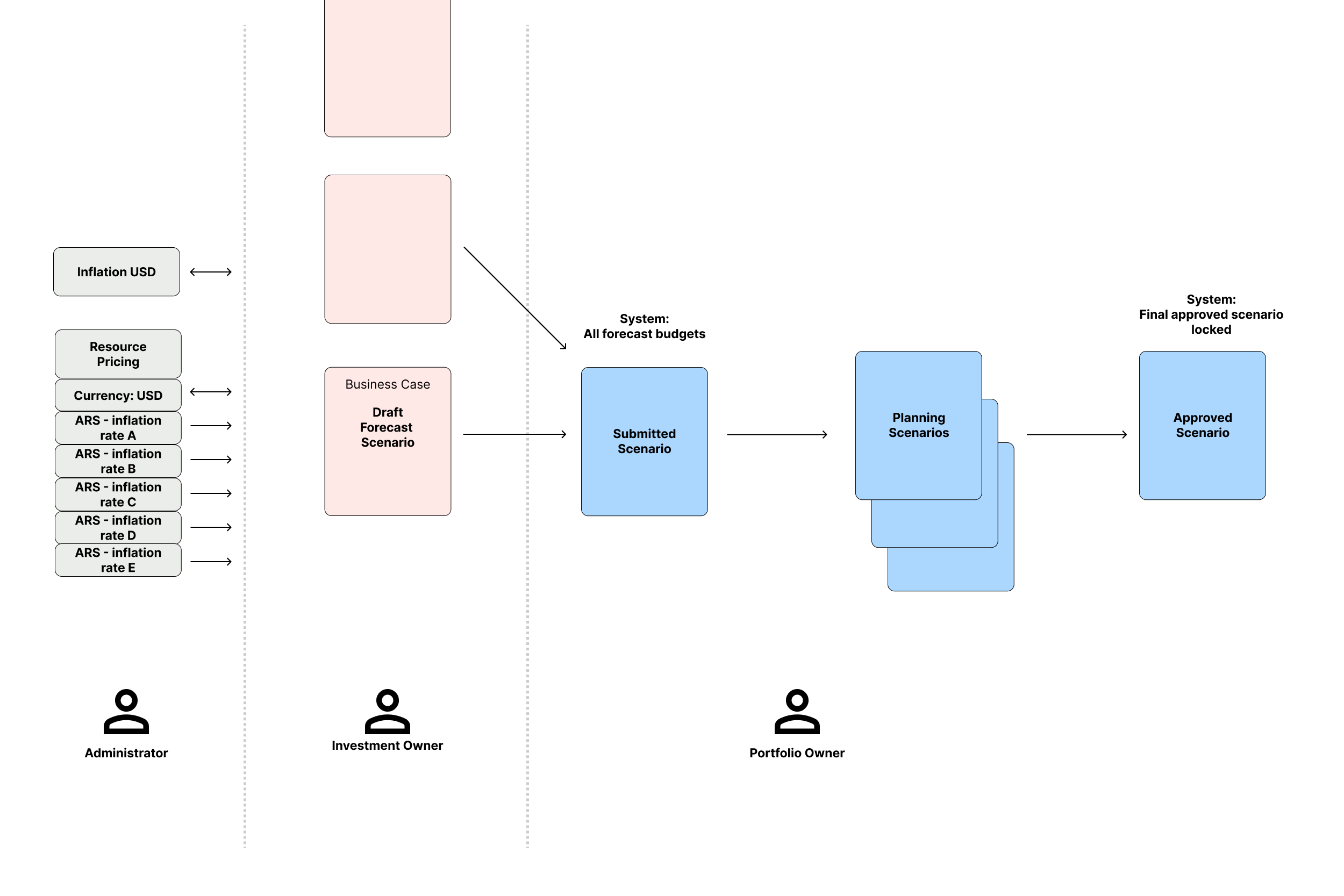
Copperleaf has two types of forecasts: draft forecasts and scenarios. Scenarios could apply fiscal parameters — inflation rates, resource pricing, exchange rates — to model different planning conditions. Draft forecasts could not. They were architecturally separate objects with fewer capabilities.
This created a real problem. Users working in draft forecasts couldn't apply or adjust fiscal parameters, which meant early planning work happened in a different financial context than finalized scenarios. The disconnect led to inconsistencies between what users saw in drafts versus what they saw after promoting to a scenario — undermining trust in the numbers.
Initial state: draft vs. scenario
Problem 2: The multi-currency workaround was breaking
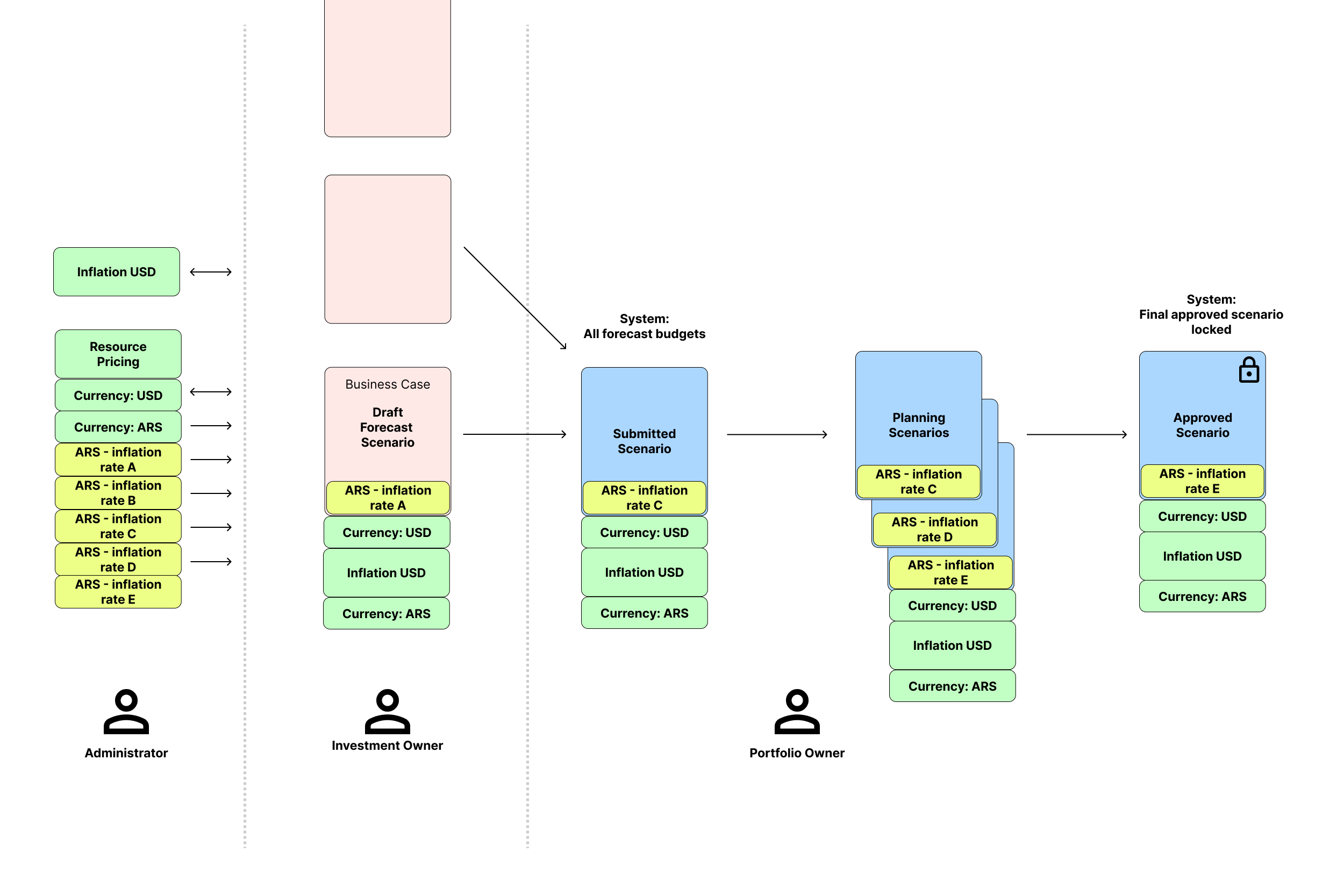
Clients operating in high-inflation economies needed to model a second currency — for example, Argentine pesos alongside US dollars. The system didn't support this natively, so clients had found a workaround: they were using a resource pricing function, which was never designed for this purpose, to simulate inflation on a secondary currency.
Under normal conditions, the workaround produced approximate results. Under extreme inflation — like Argentina was experiencing — it failed. Calculations became inaccurate across the application, and exchange rates had to be updated manually through a separate data loader. The process was slow, error-prone, and couldn't keep pace with rapid economic changes.
Two clients were classified as high-risk as a result of these issues.
Initial state: fiscal parameters and currency workaround
Shown in green: the existing USD and ARS currency display with USD-only inflation modeling. Shown in yellow: manually created inflation scenarios for Argentina, causing downstream data inconsistencies.
Constraints
This wasn't a greenfield project. The system had accumulated years of assumptions about how draft forecasts and scenarios worked, and real clients had real data structured around those assumptions.
- Legacy data structures. Draft forecasts and scenarios were stored differently. Changing this required careful migration design to avoid corrupting existing client data.
- Active workarounds in production. Clients were relying on the broken workaround for live forecasting. Removing it required a supported migration path, not just a fix.
- Cross-team dependencies. The work touched engineering, QA, the Customer Experience team, and client-facing staff. All needed to be coordinated before, during, and after release.
- Scope and cycle time. The project ran for over a year as a single release. This introduced compounding risk — a lesson the team took forward into future work.
Discovery
Task analysis
I started by mapping every interaction with the existing system — every flow, state, and edge case. I documented client and PM meeting notes alongside direct application interactions so the full picture of what the system did (and didn't do) was available in one place. This record became the foundation for the project and helped new team members onboard quickly as the work progressed.
One early surprise: the Administrator persona was more central than expected. We initially focused on Investment Owners and Portfolio Owners, but task analysis revealed that Admins managed the fiscal parameter configuration that everyone else depended on. They had to be included in the design scope.
Stakeholder and client interviews
I conducted interviews with clients, developers, Product Managers, Customer Experience representatives, and client-facing staff. The goal was to understand not just what was broken, but what users actually needed from a financial modeling system.
The feedback surfaced a consistent theme: users didn't just want accurate numbers — they wanted numbers they could trust. Inconsistent data structures and manual processes had eroded confidence in the system's output. Several users had developed personal workarounds or double-checking routines because they didn't trust what the tool showed them.
A secondary finding was unexpected: if done correctly, this work would enable a capability clients hadn't asked for but immediately recognized the value of — the ability to run sensitivity analysis across multiple budgets simultaneously.
Key Insights
Four insights shaped the design direction.
The fix had to be structural, not cosmetic. Draft forecasts and scenarios weren't just missing features — they were fundamentally different data objects. No UI change would fix the inconsistency. The draft forecast needed to become a proper scenario type.
Users wanted automation with manual override. Automatic exchange rate updates were clearly desirable. But for approved scenarios — where changes have financial and compliance implications — users needed to be able to review and confirm updates before they applied. The design had to support both.
Trust in the data was the real problem. Users weren't just frustrated by inaccuracy. They had stopped relying on certain features entirely because the output was unpredictable. Restoring confidence required consistency in how data was stored and displayed across the whole product — not just a fix in one area.
A design jam unblocked the project. At a point where the project had stalled, I brought the triad together for a focused session. In that session, we solved the core system model together. The key move — treating fiscal parameters as modular named sets that could be applied and toggled at any stage — emerged from that collaboration, not from solo design work.
System Redesign
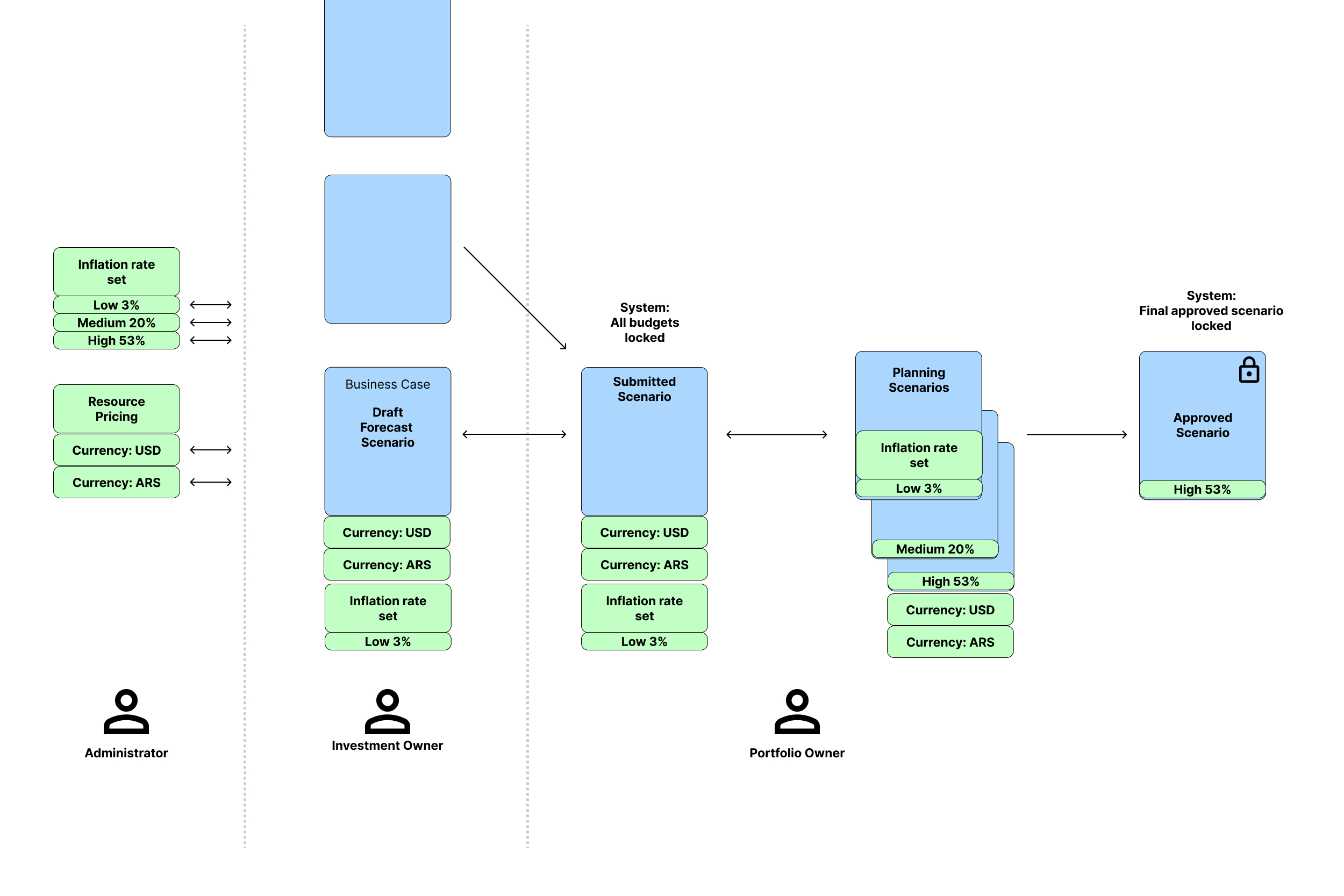
The conceptual shift was this: the draft forecast needed to become a first-class scenario. Not a simplified version — a full scenario type with the same capabilities as any other.
This single change resolved the architectural inconsistency at the root of both problems. Once the Draft Scenario could support fiscal parameters, we had a unified foundation to build the multi-currency solution on top of.
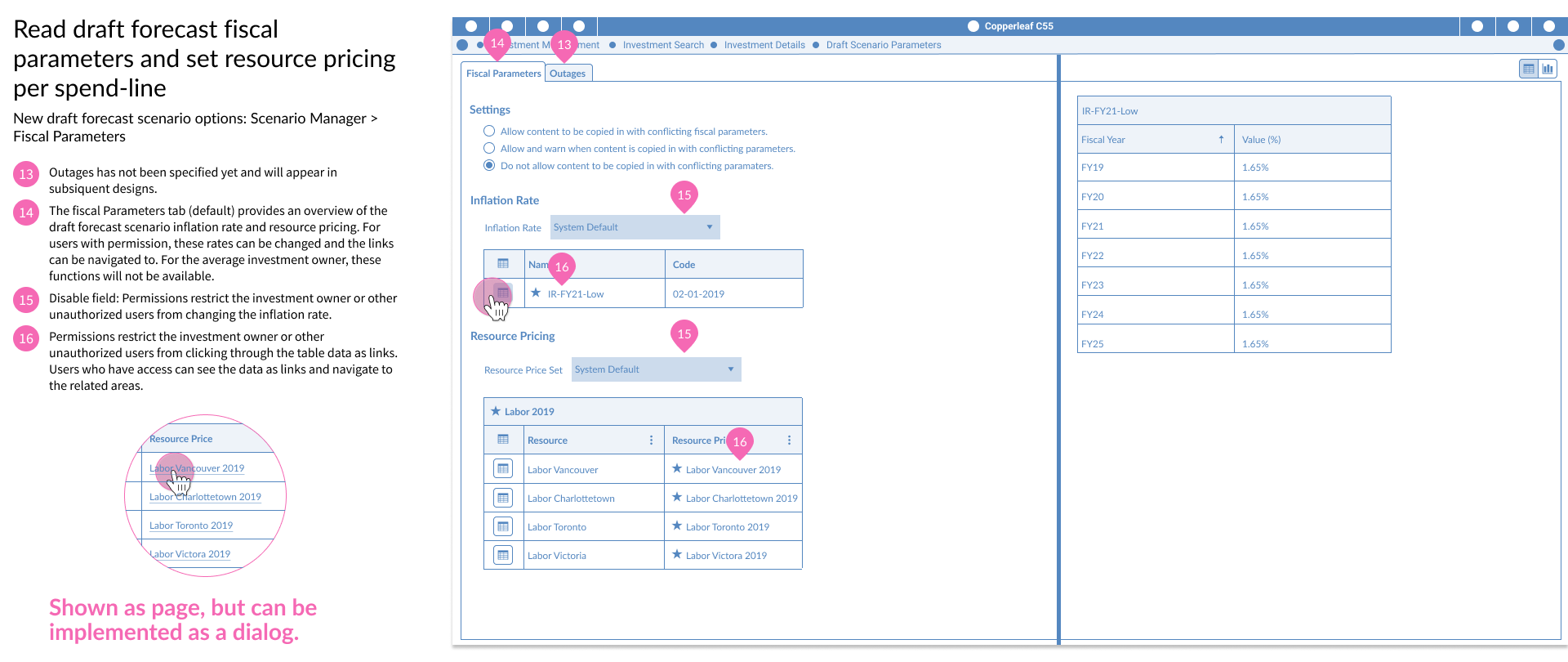
The second part of the redesign was introducing Scenario Fiscal Parameter sets (SFP) — a modular configuration layer managed by Administrators. Instead of applying individual parameters per investment, an Admin could define a named parameter set with specific inflation rates, resource pricing, and exchange rate assumptions. That set could then be applied at the investment or portfolio level and toggled at any stage of the forecasting process.
This removed the need for the resource pricing workaround entirely. It also made the system extensible — parameter sets could be reused, modified, and tracked over time.
Final state: unified scenario and fiscal parameter model
Solution
The design delivered four concrete changes to the product.
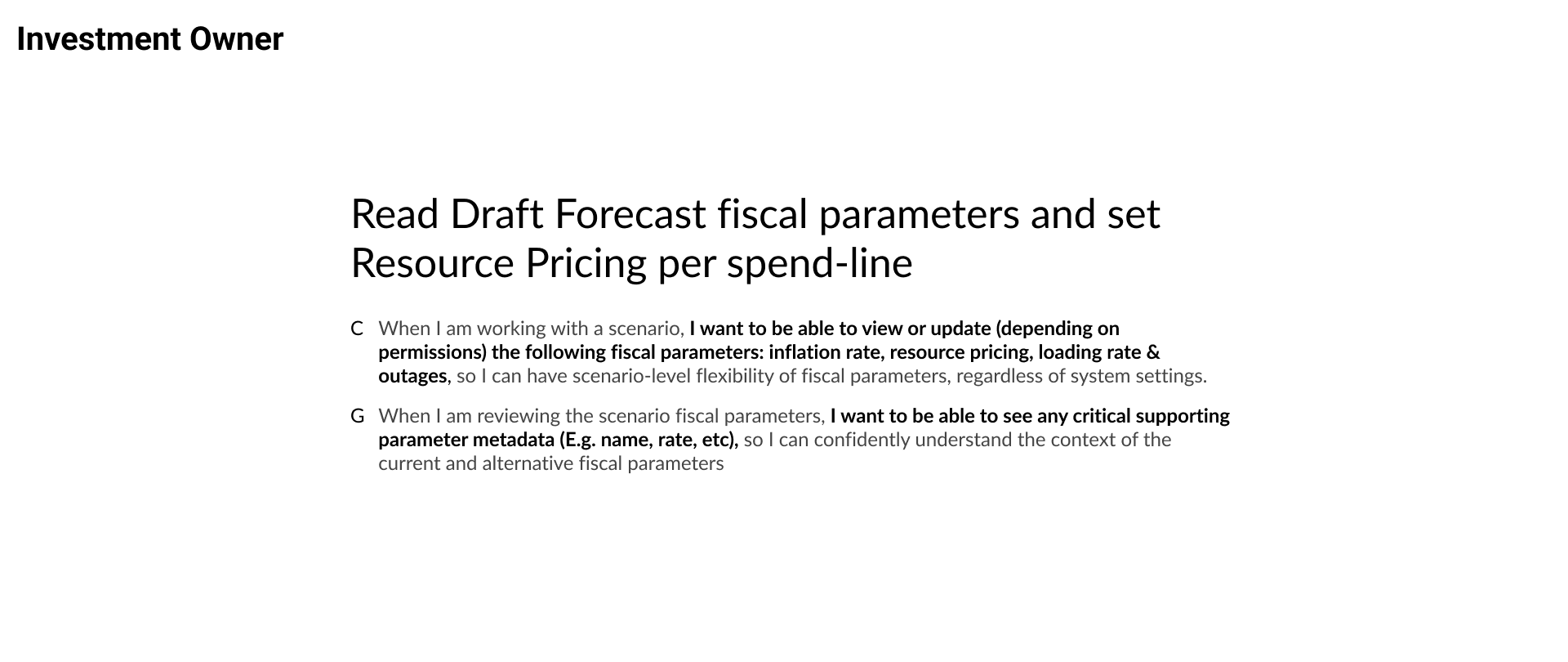
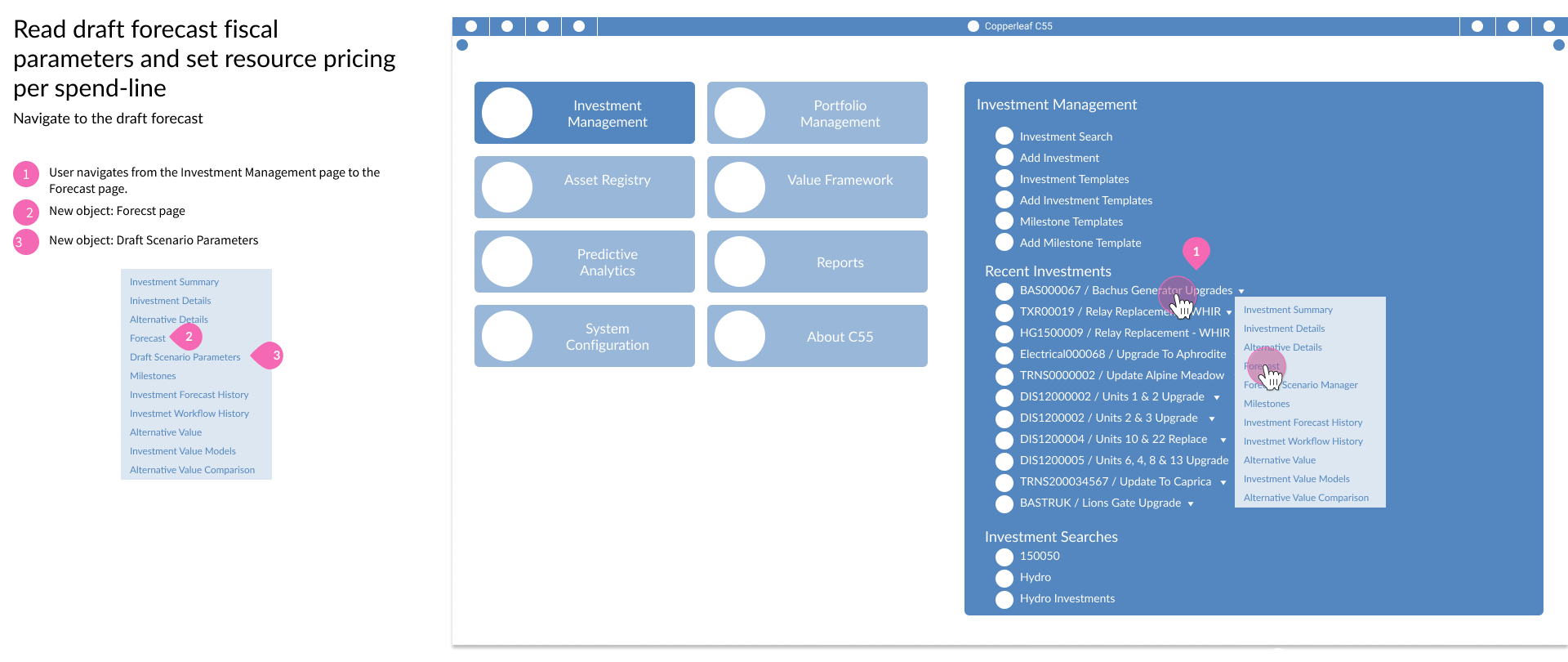
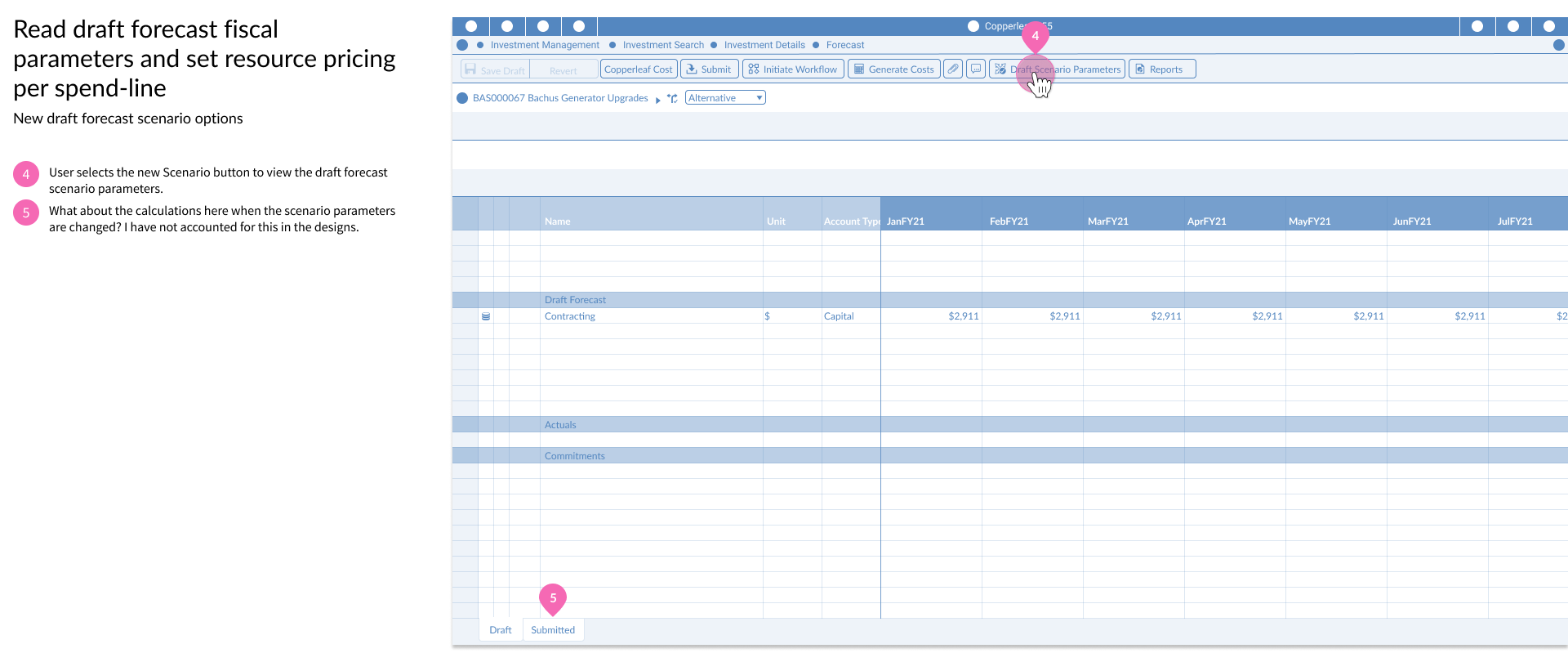
Draft Scenario promoted to full scenario. The Draft Scenario was redesigned to support all fiscal parameter settings in every location where it could be accessed. It now behaved consistently with every other scenario type.
Fiscal Parameter Sets. Administrators could create named sets of fiscal parameters — inflation rates, resource pricing, loading rates — and apply them across investments and portfolios. Sets could be created, edited, and toggled at any stage of the forecasting process.
Dynamic scenario updates. Changes to a fiscal parameter set were immediately reflected in affected scenarios, eliminating the need for manual re-submission. Historic parameter values were preserved to support analysis of past planning decisions.
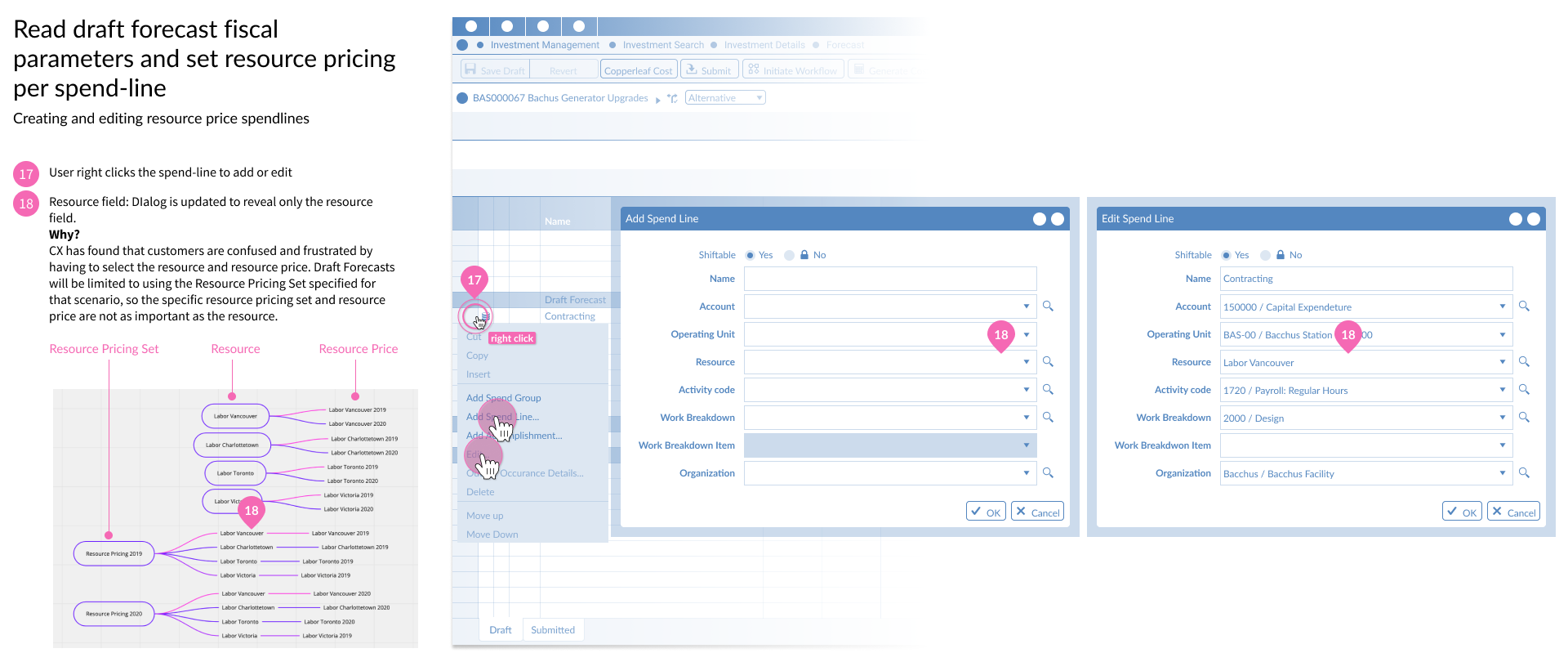
Granular spend line access. Portfolio Owners gained the ability to review and edit spend line forecast data at a more granular level than the previous system allowed, resolving a long-standing gap in workflow coverage.
Design work: draft scenario and fiscal parameter sets
Validation
We ran an internal usability study focused on the three core workflows: creating fiscal parameter sets, configuring parameters within a set, and applying sets within the product.
5
Internal participants
9
Tasks completed
100%
Task completion rate
All five participants completed all nine tasks successfully. Some required assistance on specific steps, but this was traced to prototype configuration issues rather than problems with the interaction design. The core model — create a set, configure it, apply it — was intuitive without instruction.
Feedback from the session also surfaced two navigation adjustments and one presentation change that we incorporated before final development handoff.
Implementation
The implementation required changes to core data structures across the product. The Draft Scenario change alone touched multiple backend systems, and the fiscal parameter set architecture required new data models, storage, and API design.
I worked closely with the Customer Experience team throughout, recognizing early that this upgrade would require careful communication with existing clients. We designed migration flows that showed users what was changing, what the system looked like in each upgrade state, and what steps were needed to transition their existing data.
Internal prototype review cycles were ongoing throughout development. This iterative process caught issues in navigation structure and information density before they reached production — reducing rework on the engineering side and improving the final quality of the release.
The deployment required extensive QA collaboration given the breadth of product areas affected. Coordinating across the triad, QA, Customer Experience, and client-facing teams was as much of the job as the design work itself.
Outcomes
Workflow efficiency
- Publishing 608 investment forecasts: 8 min 40 sec → 2 min 23 sec (73% faster)
- Copying 607 forecasts: 1 min 32 sec → 23 sec (75% faster)
- Submitting 1,016 forecasts: 8 min 42 sec → 2 min 19 sec (74% faster)
- Copying 15,555 forecasts: 14 min 54 sec → 2 min 43 sec (82% faster)
- Cache generation for new scenarios: 13 sec → 8 sec (38% faster)
Data integrity
- Eliminated the resource pricing workaround and its downstream data inconsistencies
- Standardized how forecast data was stored and displayed across the product
- Exchange rate changes now reflected dynamically — no manual re-submission required
- Historic fiscal parameter values preserved for past-scenario analysis
Business impact
- Retained 2 high-risk clients at risk of churn
- Enabled native multi-currency support in subsequent product releases
- 68% of clients upgraded to or installed versions including Scenario Fiscal Parameters by 2023
- Reduced technical debt in how forecast data was handled across the system
Lessons Learned
Long cycle times compound risk. Running a project of this scope as a single year-long release made it harder to validate assumptions along the way and course-correct if something wasn't working. Copperleaf moved toward more incremental delivery practices after this project, looking for ways to modularize large features without sacrificing coherence.
Collaborative ideation can unlock what individual effort can't. The design jam that unblocked this project happened after weeks of slower progress working through the problem solo and in smaller conversations. Getting the triad in a room to sketch together — with the explicit goal of solving the model, not presenting options — was what moved the work forward. I've brought that approach into projects since.
Enterprise UX requires domain fluency. You can't design for financial forecasting from the outside. The research investment early in this project — deeply understanding not just user workflows but the underlying data model — was what made it possible to propose a structural fix rather than a surface-level workaround.